
 Deutsch
 English
 Español
 Français
 Italiano
 Nederlands
 Polski
 Português
 Русский
 Svenska
 Türkçe

Axis giveaways run entirely in Discord chat. You start one with a single command, members enter from the giveaway message, and when the timer runs out Axis picks the winners at random and announces them.
This article covers starting one, every option, and managing a giveaway while it runs. If you only want the short version, see Quick start.
Quick start
-
Go to the channel where you want the giveaway to appear.
-
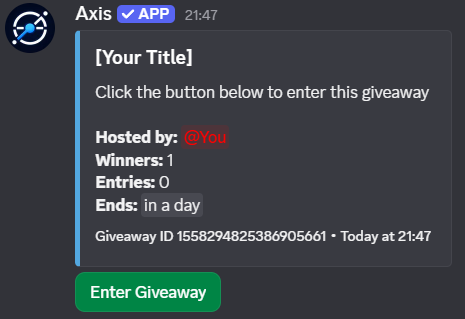
Run a command like:
/giveaway create title:[Your Title] duration:1d winners:1 -
Axis posts the giveaway message. Members enter from that message.
-
When time is up, Axis randomly picks the winner(s) and announces it. Handing over the prize is up to you.
Options
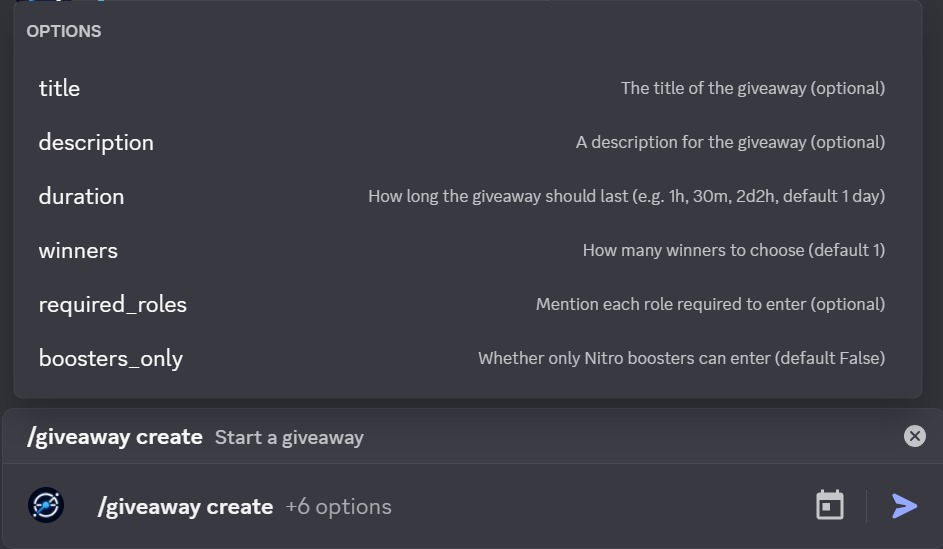
Every option on /giveaway create is optional. Run it with nothing filled in and you get a one-day giveaway with one winner.
| Option | What it does | Default |
|---|---|---|
title |
The headline of the giveaway, usually the prize | None |
description |
Extra details: rules, how the prize is delivered, anything members should know | None |
duration |
How long the giveaway runs, like 30m, 1h, 2d2h |
1 day |
winners |
How many winners Axis picks | 1 |
required_roles |
Roles a member must have to enter. Mention each role | Anyone can enter |
boosters_only |
Only members boosting the server can enter | Off |
Durations use the same format as everywhere else in Axis. See How to Use Durations in Axis if you want the full rules.
Limiting who can enter
Use required_roles when you want to reward a specific group, like members who have a verified role or a supporter role. Mention the roles right in the command:
/giveaway create title:Supporter Raffle required_roles:@Supporter
If you mention more than one role, a member needs all of them to enter.
Use boosters_only for giveaways that give back to your server boosters. You can combine it with required_roles.
Managing a giveaway
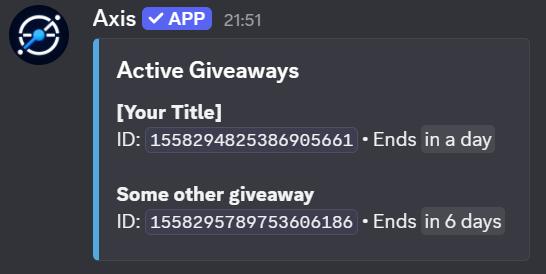
You can change a giveaway while it's running, and fix problems after it ends. Every command except list needs the giveaway's ID.
| Command | What it does |
|---|---|
/giveaway list |
Shows the active giveaways in your server |
/giveaway extend <giveaway_id> <duration> |
Adds time to a running giveaway |
/giveaway end <giveaway_id> |
Ends it right now and picks the winners |
/giveaway reroll <giveaway_id> |
Picks a new winner for a giveaway |
/giveaway cancel <giveaway_id> |
Deletes it without picking winners |
A giveaway's ID is the ID of its giveaway message. You'll also find it in the footer of the giveaway message.
Extend, end, or cancel?
- Extend when too few people have seen it.
/giveaway extend <id> 1dadds a day. - End when you're done waiting. Winners are picked immediately.
- Cancel when something went wrong and nobody should win, like a wrong prize or a typo in the rules. Cancelling picks no winners.
Rerolling
If a winner doesn't respond or turns out to be ineligible, run /giveaway reroll <giveaway_id> to pick someone else.
Each reroll picks one new winner.
Who can run giveaways
By default, the server owner and anyone with the Manage Server permission can create and manage giveaways.
If you want someone to run giveaways without giving them Manage Server, add them as a giveaway master in the dashboard.
Tips for running a good giveaway
-
Put the rules in
description. Say what the prize is, how it's delivered, and how long the winner has to claim it. It saves you from answering the same question twenty times. -
Give people time. A giveaway under an hour mostly rewards whoever happened to be online. A day or more is fairer for most servers, and gives everyone time to enter regardless of day/night.
-
Plan for no-shows. Decide ahead of time how long a winner has before you reroll.
-
Remember Axis doesn't deliver prizes. It picks and announces winners. Sending the prize is on you. It's also best to make sure that the person is responsive before giving the prize, so that they do not end up receiving it and then never using it.
Troubleshooting
The giveaway commands don't show up. Check that Axis can see and send messages in the channel. If that still isn't working, see Axis Isn't Responding to Commands. If nothing there works, get in touch with us via our support server.
Nobody can enter.
If you set required_roles or boosters_only, members who don't match can't enter. Check the roles you mentioned in the command.
I can't find the giveaway to end or reroll it.
/giveaway list only shows active giveaways. For a finished one, check the footer of the giveaway message, or use the message's ID.
Nobody entered. If fewer people entered than there are winners, Axis picks as many winners as it can. If nobody entered, there's no one to pick, so the giveaway ends without a winner. Start a new one, and consider a longer duration or more permissive entry requirements to let people enter.
Still stuck?
You can see every giveaway command and option on the commands page. If something here doesn't match what you see, tell us in the support server.